Why Are OCR Results Wrong Even When the Scan Looks Clear?
By John Wang · Published 2026-08-23 · Updated 2026-08-23
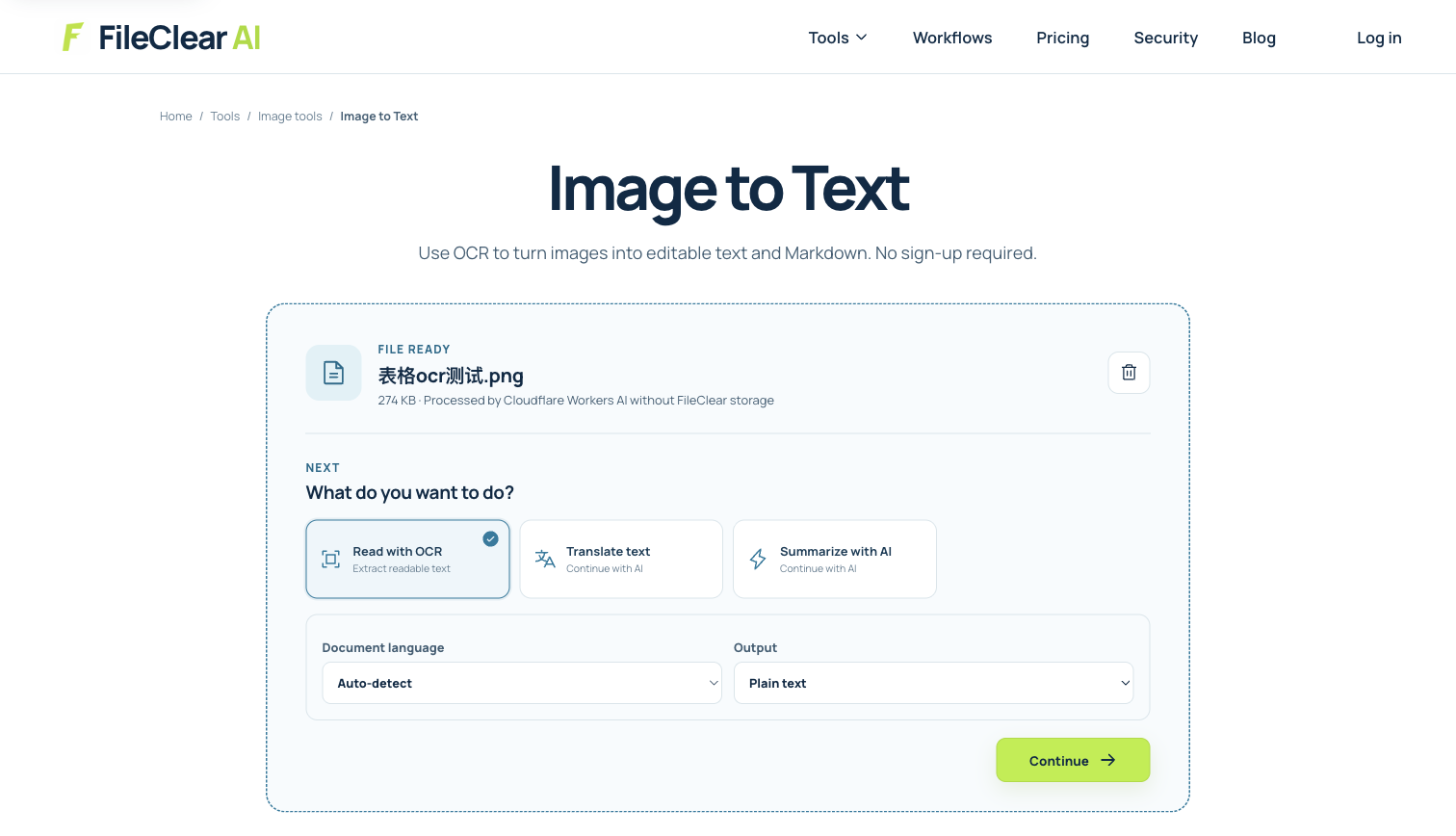
Find hidden causes of OCR errors in clear-looking scans, use a practical diagnosis tree, and verify tables, numbers, languages, and reading order.
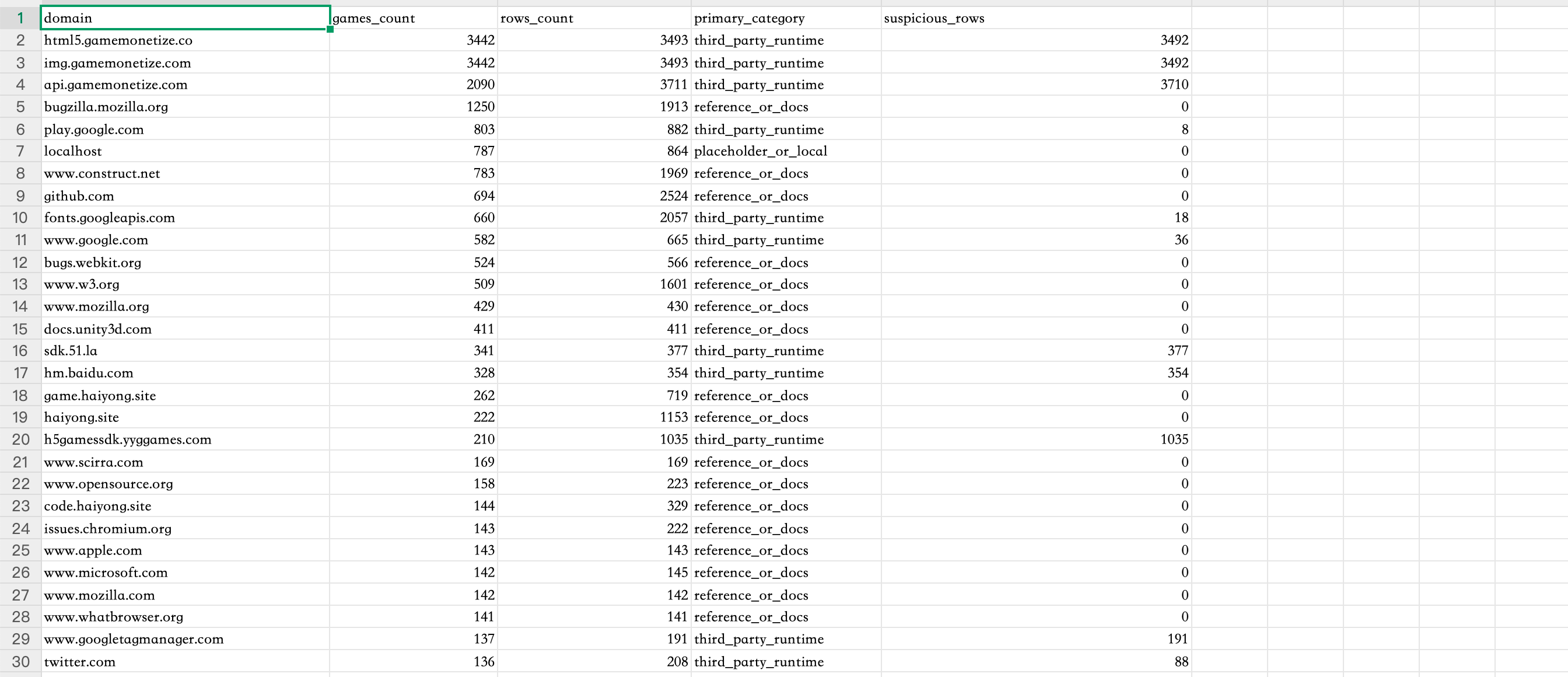
Case image: a real high-resolution table screenshot
The example contains short labels, domain-like strings, numbers, grid lines, and multiple columns—a useful stress test for character recognition and reading order without inventing an accuracy score.
- The source is a real PNG image measuring 2688 × 1160 pixels.
- The original file is 280,365 bytes (about 274 KB).
- The case records observed source features and verification steps, not a claimed recognition rate.
A human-readable image can still be difficult for OCR
People use language and layout context to resolve imperfect letters almost instantly; OCR must infer characters from pixels and then reconstruct words, lines, and regions. A screenshot can look sharp at fit-to-window size yet contain anti-aliased one-pixel strokes, JPEG ringing, resampling artifacts, faint text, or grid lines touching characters. A camera image may look clear in the center while perspective distortion changes character shapes near the edges. Tiny text can also be displayed crisply because the viewer enlarges it, even though the source contains too few pixels per character for reliable recognition.
When output is wrong, classify the error before changing settings. Repeated substitutions such as 0/O, 1/l/I, 5/S, or punctuation mistakes point to character ambiguity or an unsuitable language model. Missing lines suggest crop boundaries, low contrast, or region detection. Correct words in the wrong sequence indicate layout analysis, columns, or table segmentation rather than character recognition. Entirely wrong script or accents usually indicate language selection. This decision tree prevents random preprocessing from improving one symptom while damaging another.
Change one source condition at a time
Start with the original image rather than a screenshot of a screenshot. Keep native resolution, correct orientation, and a tight crop that includes all characters but removes unrelated margins. Deskew tilted baselines and correct perspective before recognition. Select the printed language or languages actually present. For light text, uneven backgrounds, or shadows, compare a restrained contrast or grayscale version with the untouched source. Avoid repeated sharpening, aggressive thresholding, and upscaling as a first response: they can create false edges, close letter counters, erase punctuation, and make the preview look stronger while reducing recognition evidence.
Upload the real PNG case to Image to Text and record the chosen language and preprocessing. The workflow screenshot documents that starting point without asserting a particular result. Run one controlled version, save its extracted text, then change only one variable—for example crop, rotation, language, or contrast—and compare the same set of test fields. If a PDF contains a page image, OCR PDF is appropriate when you need a searchable PDF derivative; Image to Text is better when plain extracted text is the goal. Do not convert between formats repeatedly before OCR because each resampling or lossy encoding can alter small glyphs.
Verify representative fields, not just readable prose
Build a small verification set before accepting the output. For the real table image, include a header, a domain-like value, the first and last row labels, several integers, and a value from each column. Compare exact characters, not meaning alone. Numbers deserve special attention because spell-checking cannot rescue them and a single digit may change a total, identifier, date, or account reference. Also compare row count and column association: accurate characters assigned to the wrong row are still an incorrect extraction.
For long documents, sample the hardest page types as well as typical pages: smallest print, rotated pages, colored backgrounds, footnotes, multi-column layouts, and mixed languages. Search for expected phrases and for common substitutions. Retain page or image coordinates when the tool provides them so a reviewer can trace output back to evidence. If the intended use is financial, legal, medical, or operational, route critical fields through human review or deterministic validation rules. OCR confidence values, when available, are useful triage signals but are not proof that a field is correct.
Escalate layout problems to the right extraction tool
Plain OCR can recover characters while losing relationships. A table needs row, column, merged-cell, and header interpretation; a form needs labels connected to values; a two-column article needs reading order. If characters are mostly right but their sequence or grouping is wrong, stop tuning image sharpness and choose a layout-aware table or field extractor. Conversely, if individual glyphs are wrong in every representation, improve the source or language setup before attempting structure recovery. Separating recognition from structure is the fastest way to diagnose apparently inconsistent output.
Some sources cannot be made reliable automatically: very small raster text, handwriting, damaged pages, decorative fonts, translucent stamps, severe perspective, and dense multilingual tables may require rescanning or manual transcription. Capture a new source at adequate resolution with even lighting and no motion blur when possible. Keep the raw image alongside all derivatives and document which fields were manually corrected. The defensible result is not the output that looks most polished; it is the one whose source, settings, exceptions, and verification coverage are known.
Create an acceptance threshold before processing a batch
Define accuracy rules before uploading hundreds of pages. Select representative documents and write down the exact fields, row relationships, languages, and punctuation that must survive. For ordinary archive search, a phrase-recall sample may be enough. For invoices, statements, contracts, or regulated records, require exact agreement for identifiers, dates, totals, and named parties, plus a documented human review path for uncertain output. Measuring against a fixed sample is more useful than judging whether the text generally looks readable.
Run the sample with one settings profile, record errors, and change only one variable before the next trial. Stop the batch when the error pattern changes or a new page type appears. Keep rejected outputs separate from approved data so downstream automation cannot ingest them accidentally. A clear acceptance threshold turns OCR from an optimistic one-click step into a controlled extraction process whose quality, exceptions, and review cost can be explained to the people relying on it.
Continue this file task
Related guides
Frequently asked questions
- Why does OCR confuse 0 and O in a sharp scan?
- The glyph shapes may be nearly identical at the available pixel size. Language context, neighboring characters, font design, anti-aliasing, and the selected recognition model determine which character the engine chooses.
- Should I upscale an image before OCR?
- Upscaling can make processing dimensions larger but cannot recreate missing detail. Test it as one controlled variant only; obtaining the original or a better scan is preferable when characters contain too few source pixels.
- Why are OCR words correct but table rows are mixed together?
- That is usually a layout or table-structure problem rather than a character-recognition problem. Use a table-aware extractor and verify row and column associations against the image.
- Does a high OCR confidence score guarantee correct text?
- No. Confidence is a model signal, not independent ground truth. Validate representative fields and every high-consequence value against the original source.
Sources and further reading
- Improve OCR quality — Tesseract OCR documentation
- OCR language and script support — Google Cloud Vision documentation
- OCR concepts and considerations — Microsoft Azure AI Document Intelligence documentation